
Apple Brings Vertical Tabs and Advanced AI Features to Safari in Latest Beta Updates

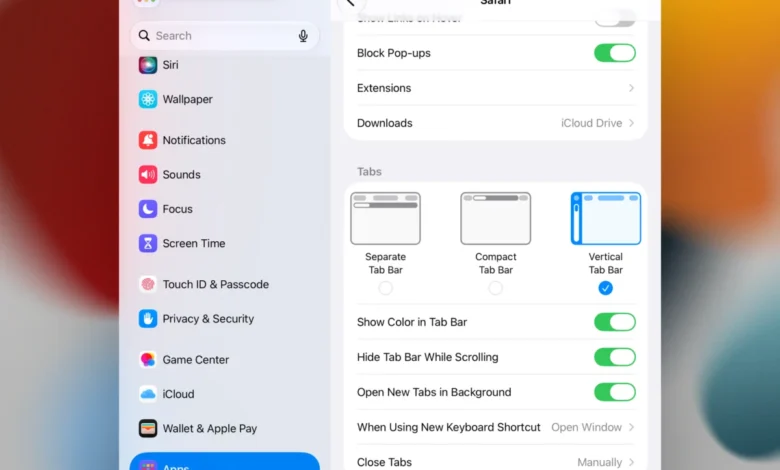
While Safari continues to hold a significant market share among Apple’s estimated 2.5 billion active device users, it has historically trailed competitors like Google Chrome and Microsoft Edge in terms of experimental UI features and advanced tab management. This dynamic is shifting with the release of the latest developer beta versions of iOS 27.3, iPadOS 27.3, and macOS 27.3. These updates introduce a suite of long-requested productivity tools, most notably a native vertical tab implementation that signals Apple’s increasing willingness to adopt power-user features typically associated with Chromium-based browsers.
The Evolution of Tab Management
The introduction of vertical tabs is a significant departure from the traditional horizontal tab bar that has defined Safari for over two decades. By shifting the navigation hierarchy to the left side of the browser window, Apple is addressing the common "tab fatigue" experienced by users who frequently manage dozens of open windows simultaneously.
In the new beta build, these tabs appear as icons by default, a design choice intended to maximize screen real estate—a crucial factor for the iPad and the newly unveiled iPhone Duo. When a user hovers over these icons, the browser reveals a preview of the corresponding window, streamlining the navigation process. This feature aligns Safari with industry trends established by Microsoft Edge’s "Vertical Tabs" and Google Chrome’s recent "Side Panel" updates, both of which have been praised for improving workflow efficiency on ultrawide monitors and tablet displays.
Beyond simple placement, Apple has integrated advanced organizational tools. Users can now pin tabs via drag-and-drop gestures, ensuring that essential websites remain accessible regardless of how many temporary tabs are open. Furthermore, these vertical tabs are fully integrated with Safari’s existing Tab Groups, allowing for seamless synchronization across the Apple ecosystem, whether the user is working on a desktop Mac or mobile hardware.
Adaptive Dark Mode: Enhancing Visual Consistency
A second major pillar of the 27.3 update is the implementation of "Adaptive Dark Mode." While modern operating systems have offered system-wide dark modes for years, the web has remained inconsistent; many sites do not provide native dark themes, leading to jarring brightness fluctuations when a user navigates between a dark-mode app and a light-mode webpage.
The new Safari beta addresses this by applying an intelligent rendering layer to websites that lack native dark support. The browser’s engine will automatically invert colors for logos and vector graphics, adjust shadow depth, and darken light backgrounds without breaking the site’s layout. Crucially, the update includes a "safety" feature for developers: specialized CSS tags can be implemented to opt-out of these automatic changes, ensuring that brand identity and specific design elements remain intact. This balanced approach suggests that Apple is prioritizing user comfort while maintaining the integrity of web design standards.
The Integration of Siri AI
The most transformative aspect of the 27.3 update is the deepened integration of Apple Intelligence-powered Siri tools. While Siri has previously maintained a degree of on-screen awareness, the 27.3 update significantly expands this capability. The AI assistant can now "read" the entire content of a webpage, even elements that are not currently visible within the viewport, and maintain awareness of all open tabs across a user’s session.
This capability serves as the foundation for new "Custom Actions." For example, a user can command Siri to group all tabs related to a specific project—such as travel research or price comparisons—into a single, organized folder. The AI can also automate the cleaning of browser history based on specific parameters, such as topic, domain, or time frame.
Industry analysts note that this is a strategic move for Apple. By embedding AI directly into the browser’s architecture, Apple is attempting to create a "frictionless" browsing experience that keeps users within the Safari environment. The ability to scrub history based on specific, granular data points also reflects a growing demand for better digital hygiene and privacy management tools in an era of data-heavy web consumption.
A Chronology of Safari Development
The trajectory of Safari has been marked by a transition from a minimalist, lightweight browser to a complex, productivity-oriented platform.
- 2003: Apple releases the first version of Safari, positioning it as the fastest browser for macOS.
- 2017: The introduction of Intelligent Tracking Prevention (ITP) marks Apple’s pivot toward privacy as a core product differentiator.
- 2021: Safari 15 introduces Tab Groups, a major step forward in managing large numbers of concurrent tabs.
- 2024: The 27.x update cycle signals a focus on AI-driven automation and UI flexibility.
This timeline demonstrates that Apple’s development cycle is intentionally paced. While other browsers iterate rapidly, Apple typically waits until it can integrate a feature with the broader ecosystem, ensuring that improvements work across iOS, iPadOS, and macOS simultaneously.

Implications for the Competitive Landscape
The decision to add vertical tabs and enhanced AI organization puts Safari in direct competition with productivity-focused browsers like Vivaldi and Arc. For the average consumer, these features might seem like minor conveniences, but for professionals, they represent a compelling reason to stick with the default browser rather than migrating to third-party alternatives.
However, the update also raises questions regarding system performance. Integrating AI to monitor entire web page contents in real-time requires significant computational overhead. While Apple’s proprietary silicon is well-equipped to handle these tasks, the battery life implications for older devices remain a point of interest for beta testers.
Cautions for Beta Adoption
While the features in the 27.3 developer beta are highly anticipated, Apple maintains a standard disclaimer regarding their use. Developer betas are designed for testing purposes and are inherently prone to software bugs, memory leaks, and incompatibility with third-party extensions.
"We advise users to refrain from installing developer-level builds on primary devices," said an industry representative familiar with Apple’s testing protocols. "These versions are intended to help developers refine their websites and apps for the upcoming OS changes, not for daily, stable use."

As the update progresses from the Developer Beta phase to the Public Beta phase, and finally to a full consumer release, the company will likely gather telemetry data to refine the Adaptive Dark Mode’s rendering algorithms and the efficiency of the new Siri browser actions.
Broader Context and Future Outlook
The 27.3 update is a microcosm of Apple’s current strategy: leveraging its massive installed base to introduce sophisticated software features that enhance the "walled garden" experience. By providing native tools that previously required third-party extensions, Apple is effectively increasing the value proposition of its browser.
As the industry moves toward more autonomous web interaction, the role of browsers is evolving from simple information retrieval tools into intelligent agents. Whether these changes will be enough to stem the tide of users migrating toward privacy-focused or highly customizable alternatives remains to be seen. However, with this latest update, Apple has clearly signaled that Safari will continue to be a primary battleground for the future of the internet experience.
For now, developers and power users are encouraged to explore these features within the safe confines of a test environment, as the tech community eagerly awaits the final release date and the potential for further, even more advanced AI-driven enhancements in the months to follow.